
Important caveat
Everything in this article is predicated on the assumed lack of hardware support for variable refresh rates which enable "hassle-free tear-free" experiences. This includes technologies like Nvidia's GSync and AMD's open-ended Freesync. While increasingly available, I still consider such displays to be in the enthusiast department and, as a developer, the only way to provide a tear-free experience without it is with an implementation that understands how Vsync works. If image quality matters to you or your customers. For this article, we assume a run-of-the-mill 60 Hz display.
Properly configuring and handling a swap chain is crucial to ensuring a responsive and pleasant interactive application. Whether you're developing a digital content creation tool, video playback software, simulation or game which requires fluid controls, there's a lot to configure in order to ensure smooth sailing. Unfortunately, rich options and poor documentation often mix poorly and result in mediocre performance, bordering on bad. This is further exacerbated by the lack of a silver bullet configuration, as each application has its own specific needs which map it to a different location on the throughput-latency trade-off chart.
A lot of the information in here is platform agnostic and applicable everywhere. However, the article is written from the perspective of a Windows desktop developer utilizing DWM, DXGI and DX APIs, handling all the caveats the majority platform entails. It is, however, not a tutorial and there is no hand holding.
Things have changed
Exclusive fullscreen mode, in the traditional sense, is gone in Windows 10. People are still polarized on the subject, I personally find it to be a step in the right direction. Anyone who owns a multi-display setup sighed in relief when they first noticed that Alt+Tab no longer resulted in epileptic blinking due to mode switching. Who could forget the agony of having your system gamma settings messed up or games crash after switching to another application because they weren't programmed to recover from an unsolicited mode change instigated by being put in the background. A game is an application like any other and the experience should be as smooth, if not smoother.
Due to ISV disagreement during the development of DirectX 12 (and DirectX Graphics Infrastructure which made it possible), Microsoft added an "immediate" mode which I'd recommend you avoid and always aim for a borderless window. We will not be discussing it here. We will also not be discussing VR as most people don't care about this at the time. In the future, it might warrant an article of its own. Same goes for variable refresh rate display technology.
So, why isn't everyone onboard? Everything on Windows 10 is presented to the screen solely through the compositor, a key component of the Desktop Window Manager. To ensure there is no tearing when presenting a buffer to the display, the swap happens exactly at the time of a vertical blanking of the screen (usually, every 16.67 ms). A non-negotiable* V-Sync. Unfortunately, somewhere along the way bad programmers happened and introduced a massive amount of input lag by misunderstanding how the swap chain behaved with V-Sync enabled which started a decades long prejudice against V-Sync among gamers, all thanks to a few popular, but technically inept games.
Gamers disabled it altogether and lowered settings to a point where they could consistently hit 200 frames per second. They ignored the screen tearing and the drop in rendering quality because it gave them a spring in their step in-game as all the unnecessarily computed frames were just discarded and the latest one was used, holding their newest inputs. As a developer using fullscreen exclusive mode, you didn't have to justify yourself to DWM, you would just say: "Here's the fresh buffer, read from it, I don't care if you were in the middle of another buffer." And... It's gone. Someone's bound to be upset.
The root of V-Sync prejudice
Why do some games have ridiculous input lag with V-Sync enabled, even when they complete frames in less than 16 ms? Generating a frame for any modern game running on a computer with recommended specs does not actually take less than 16.67 ms, no matter what the Steam FPS overlay tells you. The GPU time tells only a part of the story. CPUs are required to read inputs, update state and then define, encode and enqueue all the work that needs to be peformed subsequently on the GPU to get a complete frame to present to the screen. Optimally, this happens in less than 16.67 ms. So, if you were to press the move key right now in an optimal game (CPU time: 16ms, GPU time: 16ms), in the best case scenario your changes would be registered in just over 33 ms, hitting the (relative) second vertical blanking event provided that the CPU work began at exactly after the last vertical blanking event. To understand this a bit better, let's start "at the bottom" and work our way up.
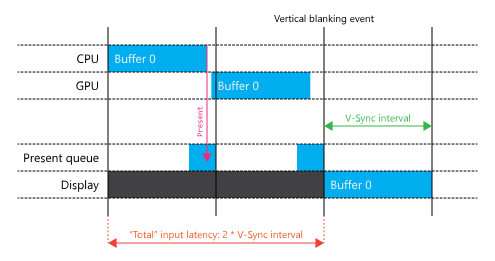
With the approach outlined in the example diagram above, the CPUs are yawning while the GPU is filling Buffer 0. The solution to this is to introduce pipelining. The CPUs can begin work on a new frame immediately after a present is queued (implicitly by calling IDXGISwapChain1::Present1). This doesn't reduce latency, but it does increase throughput. Until now, we have only allowed a single present to be queued, hence why the CPUs didn't start working on the next frame immediately. This is the implicit minimum frame latency of 1. To allow for pipelining, we need to allow for at least two presents to be queued (our maximum frame latency) and match the numbers of available back buffers. Otherwise, we'd have to wait on a surface to become available. By default, which is what a lot of people use, the maximum frame latency is 3. We don't necessarily have to hit all 3 presents, these settings are there to ensure a smooth framerate at the expense of latency when hiccups happen. Hiccups are a result of deviations in CPU and GPU times combined with the shifting phase of CPU work with respect to a blanking event, incurring a miss of the next vertical blanking event as demonstrated in the image below.
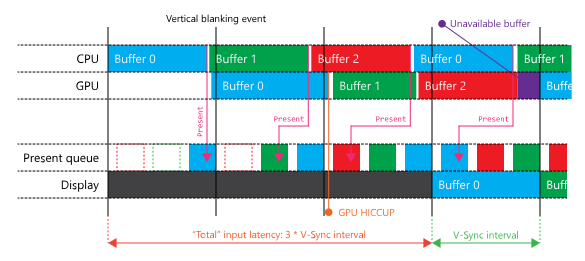
While this has been neatly set up to happen right at the start for demonstration purposes, this will happen. The phase of CPU work with respect to vertical blanking events changes every frame and both CPU and GPU workloads vary from frame to frame, a third present will eventually find its way into the queue and demand its time on the screen. After that happens, it is highly unlikely a three frame latency will be undone (and even if it were, it would just happen again). Which increases your average baseline input latency to just over 50 ms. Furthermore, if a buffer is being used on screen, the GPU cannot proceed to work on it. This results in the GPU having gaps in the timeline as it delays work beyond the next blanking event, when the current front buffer's time is up. You might be thinking: "I'll just have 3 back buffers and that will fix it." That would actually only make things worse. Once the present queue is full, you will be able to encode the next frame, but once you inevitably attempt to present, you will cause a block inside of IDXGISwapChain1::Present1. It waits until the queue is reduced by one (next vertical blanking) and then inserts it at the end, returning back to user code. This vicious cycle would continue with frames constantly queueing after blocking, earning you an additional 16.67 ms latency penalty for a grand total of just over 66 ms on average.
50-60 ms is the usual input latency incurred by misunderstanding swap chains (usually leaving them on default), and that's when you're aiming at a compute budget that is less than 16 ms on both the CPU and the GPU. Games that are locked to 30 FPS (budget being 32 ms for each), you usually get more than double the latency. And this is just your baseline, self-inflicted input lag. On top of all this, there is the constant 60-80 ms latency of having the actual image transmitted and displayed on the screen. Console gamers have been living with latency reaching 200 ms for years. Most PC gamers feel comfortable with latency being around 100 ms, although they have no idea it's actually so high, they gauge it by feeling it. In the next section, we discuss how to bring baseline input latency down to 33 ms for games aiming at 60 FPS games without tearing (or 66 ms if you're going for 30 FPS, nobody's judging.)
Adapting to change
As we touched on in the beginning, Windows took the stance that nobody receives special treatment by default. All applications go to the screen through the DWM compositor, which presents content to the screen at vertical blanking events (a "non-negotiable" default V-Sync). One of the primary complaints about previous OS versions (and associated APIs and runtimes) was the unnecessary surface indirection involved with regular windows where the client area was filled on the GPU because one couldn't just pass a handle to the DX filled, resident surface on the GPU to DWM for composition on the GPU. Naturally, this roundtrip incurred unnecessary latency and had to go. With Windows 8, and more dominantly in Windows 10, this became the legacy model (so called BitBlt presentation model) in favor of a new, more sensible flip model which could directly pass the handle to the freshly minted resident buffer to DWM for compositing, opening the door to proper borderless fullscreen windows. However, one must do a little bit of configuration to get the best results when it comes to responsiveness.
If it hasn't been made abundantly clear until now, V-Sync is now implicit. You don't need to synchronize on any particular interval inside of IDXGISwapChain1::Present1, in fact, the semantics of it are different in the flip model. An interval of 0 indicates to the runtime that it should cancel the remaining time of the previously queued present should the next one finish computing on the GPU before the previous frame's time on screen is up (it could be told to stay on screen for up to $n$ intervals). This combined with a maximum frame latency of 2 enables you to hit up to 120 FPS and latency as low as 17 ms.
Reducing latency involves a few steps, the first one being reducing the maximum size of the present queue to 2 by calling IDXGISwapChain2::SetMaximumFrameLatency. As we've already mentioned, the maximum frame latency is set to 3 by default. Reducing from 3 to 2 will enable us to have a latency of 33 ms or lower, provided we fire off work at optimal times. To actually be able to queue two presents and not wait on a currently presenting front buffer, the swap chain needs to be created with 3 buffers (there is no longer an implicit windowed front buffer which was part of the indirection scheme). Two of the buffers will be always available for rendering while one will be used by DWM for composition.
So, what is the optimal time to start updating state and developing a frame? Right at the last possible microsecond where the CPU part can do its work and finish just before the next vertical blanking event. In practice, when you're releasing a new application, you have a very specific (although open) set of hardware which only has a lower bound defined by minimum hardware requirements at which it is still possible to have an interactive experience. Hardware on which both the CPUs and GPUs will pretty much be doing a lot of work, usually up to 15-16 ms each (or 30-32 ms if you're targeting a low-end console). Thus, the previously discussed optimal time will be around a vertical blanking event, so you might as well have the system wake you up to prepare the next frame once it happens, unless there are open slots in the present queue in which case it will call you immediately. This is demonstrated in the image below.
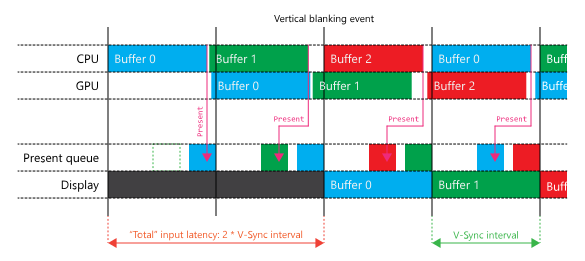
This is achieved in code by creating your swap chain with the DXGI_SWAP_CHAIN_FLAG_FRAME_LATENCY_WAITABLE_OBJECT flag, which is also a prerequisite for setting frame latency on the swap chain. This enables you to sleep on an associated, cleverly titled "waitable object" which only wakes you up at the optimal times described in the previous paragraph. The idea is that you're not supposed to be running a busy loop which would constantly start too soon or too late, incurring additional latency. You can invent this on your own, though. There is no magic to it, just track your timings carefully and sleep based on them.
And that's all there is to it, keeping it simple in the face of too many options. I implore you to give this a try, you will find a surprisingly nimble mouse and keyboard with no sacrifice in image quality. Until next time!