Latest posts in Programming
Reimplementing Vice City with seamless improvements
Domagoj Pandza on July 16th, 2019
Programming
Show in single article view

A few months ago, I had an idea for a hobby project, to rewrite an old game in a modern way, preserving the gist of its gameplay while taking creative liberties with the underlying technology. After some consideration, I decided Grand Theft Auto: Vice City would be a great match for this type of project. Now that I've got some free time, I decided to get to it. This article is the first in the series, documenting my progress.

If you're unfamiliar, GTA: Vice City was a seminal entry in the Grand Theft Auto franchise, it was developed in less than a year following Grand Theft Auto III's earth-shattering success back in 2001. Technologically, they are nearly identical, to the point that the main archive's filename remained gta3.img. But experience-wise, they were night and day. Vice City was the game which made GTA what it is today. III, however successful, was merely setting the scaffolding for it.

You're reading the Motor Vehicle Theft series

Motor Vehicle Theft is a hobby reimplementation project of Grand Theft Auto: Vice City, progress and description of which is documented in the articles of this series.

Next article

Define "reimplement"

Not quite in the vein of OpenMW

Unlike most of these projects, I'm not interested in making the game playable on other operatings systems or making a replica of the original game where the only benefit is proper functioning on modern high-DPI displays with widescreen resolutions. There are mods for the original game that get you there, more or less. Like any worthy music cover, taking a spin on the original is what makes the whole process fun and worthy of consideration, both for users and developers.

Vice City was a great game in 2002. In 2019, it's... It didn't age well. Here are some of the issues I've identified and intend to change fundamentally:

  • Outdated streaming system is woefully incapable of challenging a modern machine.
  • The formats used belong in a museum, not to mention how badly they're designed.
  • GUI needs replacing given that it is fairly low resolution and not suited for modern displays.
  • All the player mechanics are... Not good. They're clunky, clumsy or just plain imprecise.

The streaming system

The distances used for LoD resolution are laughable, traffic/pedestrian generation rules are abysmal, stuff unnecessarily fades into view, city is divided into zones with load barriers. The city geometry is beyond simplistic and, after crunching the numbers, the vertex/triangle count of the city itself (counting every instance) doesn't rival a single modern game character in terms of complexity.

The primary archive containing the majority of the game's textures and models is barely 312 MB. It can be loaded completely into system memory even on the shoddiest smartphone in 2019. And that's pretty much what's going to happen, unlike in the original where the archive is just "target-locked" and permanent storage is called upon way too often unnecessarily.

The formats
Alongside the primary archive and a few exposed common, barebone texture dictionaries and 3D models, a big portion of the game files are plaintext files which range from listing the number of objects defined for the world (their definitions and placements) to weather pattern descriptors via Tommy's fist fighting mechanics (defined in fistfite.dat). The main archive was designed for reading off an optical disc, with wide alignment (2048 B) inducing lots of unnecessary padding. Most consumer machines today don't even have optical disc readers anymore. The following is the "important" format list:

  • DIR+IMG is the primary archive format combo. Former is used to index the latter.
  • ADF file format is used for radio stations. It is obfuscated (lmao). XOR 0x22.
  • DAT "file format", more like a generic extension, is used for general gameplay data.
  • IDE file format represents definitions of items that can be placed in the world.
  • IPL file format represents the actual placements of items in the game world.
  • IFP is the animation format, nothing to write home about.
  • SCM is the script format given the game uses a custom scripting engine.
  • DFF/TXD/RAW are formats for models, textures and sounds respectively.

Graphical User Interface

Pretty much the only data modifications that will be undertaken by hand in this project. Radio UI needs love especially. One of the strongest aspects of Grand Theft Auto is the licensed music. My intention is to drop the shoddy text-based radio interface in favor of the radio wheel present in Grand Theft Auto V.

The mechanics

While the driving, running, shooting and fighting animations will not be changed as that would entail manual editing of the data of the original game (which is a no-no), the way they're actuated will be changed. Also, their dynamics. In fact, that's a given as even replicating original behavior would require a custom rewrite.

So, where do you even start?

Got to have a world to play in.

It's not that difficult to pick a starting point, the most important character of every GTA game is the city itself. To this end, one needs to load all the files specifying the map constituent objects, stored in gta_vc.dat and default.dat as plaintext lists of pertinent item definition and placement files. These are all in plaintext and are more or less trivial to parse to find the required model, texture and sound names to index into the primary gta3.img archive as well as secondary .sdt/.raw sound archives. This is done by first parsing the binary gta3.dir which is essentially the directory index of the former. Each entry is 32 bytes long, which makes loading all 6034 entries a breeze. The format is as follows:

struct directory_entry {
    std::uint32_t offset;
    std::uint32_t size;
    char file_name[24];
};

As I mentioned, the IMG format was envisioned in the age when optical discs were the primary source of data for console video games. To this end, the architecture of the format revolved around sectors sized and aligned on a 2048 B (2 KiB) boundary. As you might imagine, this introduces a lot of padding for the 312 MB blob of mesh and texture data. To clean up the mess, I am introducing a unified package format with support for compression and much lower alignment requirements, to coalesce all the disjoint data into a whole.

Helping the player navigate areas by textually marking each area as they pass through them in the corner of the screen.

As discussed, IDEs are fairly trivial files which hold a bunch of plaintext entries with unique IDs, model and texture dictionary names alongside various metadata and flags needed by the original Renderware engine. Most of these flags are outdated and unnecessary, except the ones that aren't (hah!). An example of an object (objs) item definition is as follows:

# "objs" defines that we're now parsing objects
objs

# One of many entries
# id, dff model name, texture dictionary, number of subobjects, draw distance and flags
200, ind_land101, pjs, 1, 127, 0

# signifies end of objs section
end

We'll be changing the renderer from the ground up and producing realtime lighting, so many of the flags will be ignored as they were meant for an age past. We'll also be ignoring higher LoDs as, let's face it, even the 0th one is lacking in detail on a modern machine. Draw distance will be completely ignored, too, because even the modest machines can handle everything an engine written in late 1990s can throw at them.

Similarly, item placement files (IPLs) consist of a lot of unnecessary data for a modern reimplementation, the following specification for a single item placement is used:

IDE unique ID, Redundant DFF name, Interior ID, X, Y, Z, ScaleX, ScaleY, ScaleZ, RotationX, RotationY, RotationZ, RotationR

We will be ignoring all the data used for avoiding loading interiors and instead are going to have them treated the same way as anything else, relying on our fast data-oriented culling system to get rid of unnecessary instances when not in view.

More intricate info map zone data file containing information on pedestrian and vehicle spawning, constantly consulted by the main gameplay script.

There are also collision and zone files which are relevant for the physics and gameplay systems, latter defining a lot of the rules on where certain pedestrians spawn and at what times, that sort of information. All of this neatly packages up the map, making it rather trivial to get it up and running. The terrain itself is cut up into quadratic meshes and enjoys no special status which further simplifies things wrt a modern game. As for the sky, my intent is to completely ignore everything that defines the horrible gradient skies and instead we'll introduce a sun, atmospheric scattering and neat clouds and link all of them to the time of day / weather system.

A quick look at the GUI redux

Radio killed the low resolution GUI star

We discussed the need to redesign the GUI, both code and design wise, to be more visually appealing and to play well high-DPI displays. What better way to introduce the GUI redux but with a sampling of the radio station selection UI.

This would be a peculiar place to start with if we were tackling any other game, but music has been a staple of the Grand Theft Auto franchise since 2001 in the form of hand-picked soundtrack licenses distributed over a number of fictional radio stations. From Flashback FM to Vladivostok, each game had something for everyone's ears. Vice City is considered to have one of the best soundtracks of all the GTAs with fan favorite stations such as Flash FM, Emotion 98.3, VRock and Fever 105 (Cool like a cucumber and just as useful!).

Contrasting 2013 to 2002...

Before Grand Theft Auto V, going through the available radio stations was a chore as it was arranged in a linear fashion and actuated by spinning the mouse wheel. After two decades of Grand Theft Auto, Rockstar North finally figured out that they can apply the weapon selection wheel approach to choosing radio stations as well. This was the result:
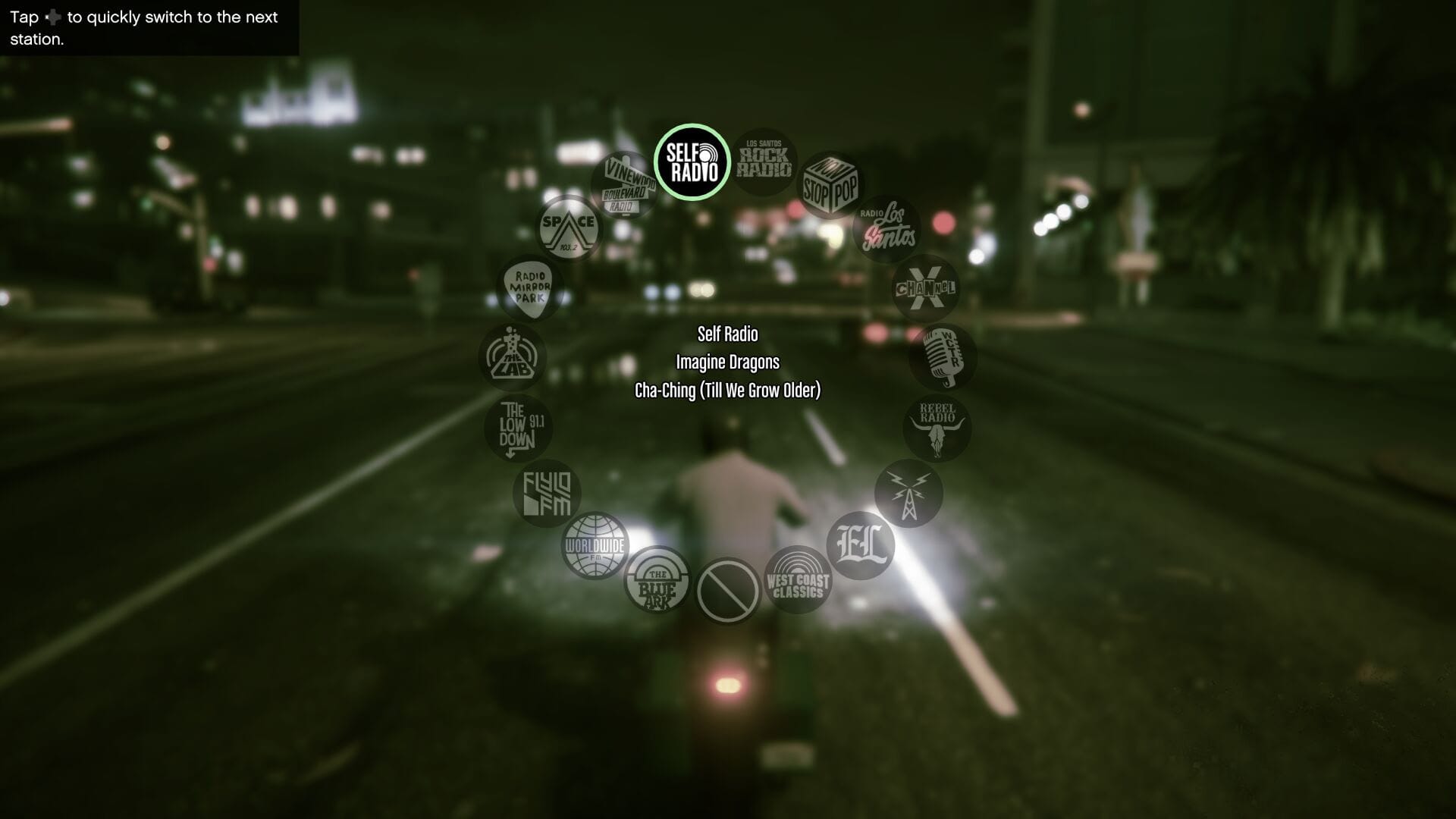
Not much to say here, cool and good.

Simple and efficient, not to mention they finally remembered to display the current song name for those who are discovering it for the first time. Which is usually a substantial portion of their audience if "GTA brought me here" comments on YouTube are to be believed. In Vice City, radio stations are just simple text rendered at the top of the screen without any information about the current song playing. You can take a look at it below if it had faded from your memory over the past... Wow, almost two decades.
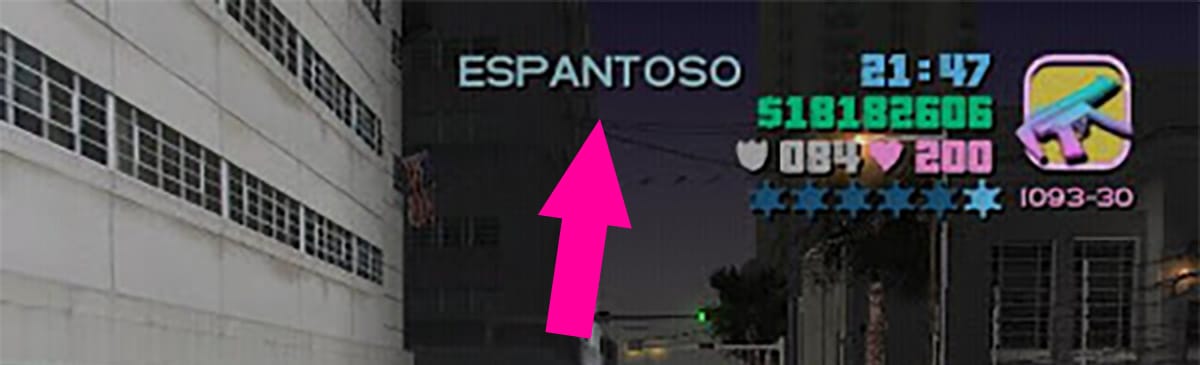
Just no.

User experience here is not great, neither functionally nor aesthetically. On first glance, you have no idea what radio station precedes or succeeds the current one. There is no information about the currently playing song or whether it is stuck on one of those "funny" in-between sections which get old quickly... Well, except for Fever 105 and Emotion 98.3 bits, their hosts are amazing.

...And how I did it

While my initial intent was to just implement the same wheel as seen is Grand Theft Auto V, I felt that would detract from the 80s vibe and the overall aesthetic of Vice City which I'm very fond of. To find a decent compromise, I made a visually pleasing blend of the two. Sequential changing, but a flat circle where you have a choice of two radio stations on each end as well as a glimpse of what is beyond them. The following is what I ended up with:

The redesigned radio station picker GUI for my reimplementation of Vice City.

As there are only nine radio stations in Vice City, going through them is slick even with this admittedly form-over-function 80s neon design. Saturation is pretty heavy, but I feel it is in line with the overall cartoony approach to the GTA "3D" Universe of which Vice City was a part of. In essence, the 3D/HD difference is largely in the tone of the game. Since Grand Theft Auto IV, the franchise became a lot more serious in its attempts at social commentary and exploring darker themes with more true-to-life rendering.
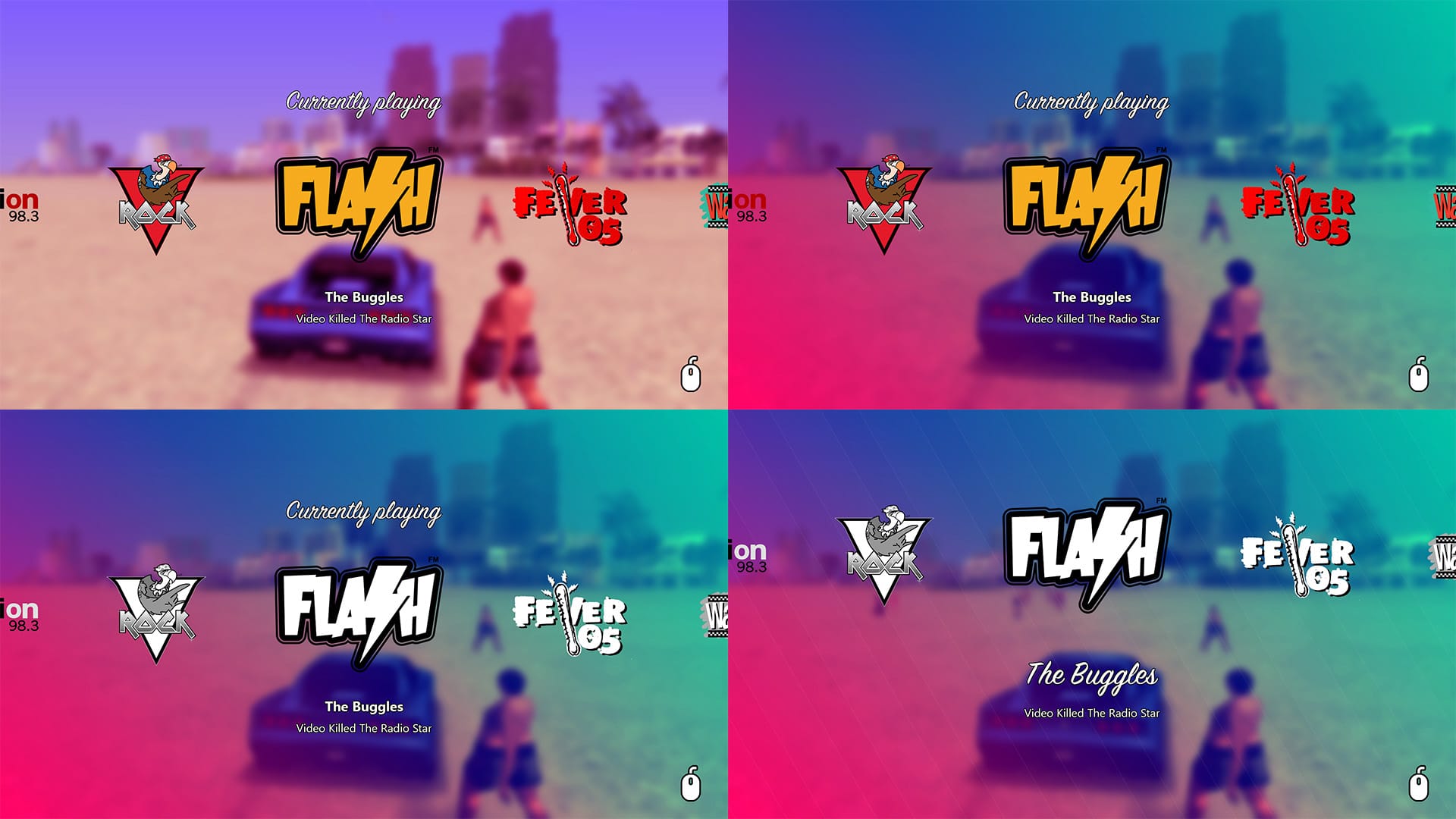
Many attempts were made.

But I digress! Naturally, that result took a while to arrive at. I knew I wanted to apply a Gaussian convolution to the world behind the radio station UI (activated by holding Q just like in GTA V) to focus the user's eyes on the choices. I also wanted to show metadata regarding the current song playing and to use radio station icons instead of text. On top of all this, I desired to match this with the cyan-pink vibe Vice City has going for it. Above you can see the multitude of steps taken.
Implementing an append buffer in Metal/MSL
Domagoj Pandza on March 3rd, 2018
Programming
Show in single article view

Recently, I had an exchange with a colleague of mine whose background is primarily in conventional graphics APIs with limited compute capabilities, he was complaining about the lack of an intrinsic append buffer in MSL. Certainly not the first time this was brought up to me or somewhere else online. I thought it would make for a good article to show both why an intrinsic one is not necessary and how you can roll your own if you're working with Apple platforms. If you're not familiar with an append buffer in the context of GPGPU, it's a structure geared for queuing entities processed in parallel without in-fighting between threads for a slot, which is to say, it supports temporally unordered access. When it comes down to it, it's really just a simple frontend consisting of a single method which manipulates the underlying buffer and its associated atomic counter.

In HLSL, which is considerably less expressive than MSL, the structure in question is provided intrinsically (AppendStructuredBuffer<T>) as it is impossible to link a counter and a buffer together in a custom generic structure. The buffer which is to be augmented with append functionality needs to have its unordered access view marked as such through the DirectX API on the CPU side. This enables the runtime to procure the necessary atomic counters which are hidden from the user. For us, everything will be a bit more explicit. In the next few paragraphs, you will find out how to hide the atomic counter so the user doesn't have to lug anything around as long as they size the underlying buffer appropriately.

Understanding the limitations of MSL

It's merely a subset

As you're probably familiar, the Metal Shading Language is based on the C++14 specification and a subset of the functionality specified therein, which sounds very impressive and is bound to give people the wrong impression. Before we get to implementing our append_buffer<T>, we need to reiterate on the limitations of MSL so that certain implementation decisions don't feel jarring to those versed in C++, but not necessarily MSL.

Forget about inheritance

It is not possible to extend the functionality of your classes or those provided by the Metal standard library. Naturally, from this follows that virtual specifier (dynamic dispatch) and dynamic_cast are not allowed. Mind you, even if we had some modicum of inheritance, the latter wouldn't work due to the complete lack of runtime type information.

new/delete are not available

As with any other shading language, all persistent allocations are performed through the appropriate APIs on the CPU side and fed into the appropriate shaders running on the GPU, and as usual, both sides need to agree on layout, offsets and bind points. Pointers and references are also limited only to more persistent data locations and require an appropriate address space attribute prefix, one of device/constant/threadgroup/threadgroup_imageblock. Temporaries are passed around solely by value, just like in HLSL. So, if you thought you could pass a struct by constant reference or maybe even move it, nope.

But wait, there is more

Obviously, exceptions are not supported and thus noexcept is meaningless. You can't perform recursive function calls as GPUs are not quite there yet. goto is not available, now if only we could get rid of it in C++20y as well. Storage class specifiers register and thread_local are not available in MSL, former of which was also deprecated in C++11.

Shopping at the atomics store

Atomicity and synchronization operations, memory ordering, atomic data types

The part of the Metal standard library (metal_stdlib) dedicated to dealing with atomics is contained within metal_atomic. Don't worry, you don't have to explicitly include it. There is a myriad of operations available, just like in the C++ standard library itself and intrinsics that come with HLSL. All devices which are certified for Metal 1.0 support relaxed memory ordering and atomic_(u)int. Relaxed memory order makes no guarantees on the ordering of the memory operations as observed from any one thread, but it does guarantee atomicity which is all we need to enable an atomic counter. We'll be using atomic_uint for the counter type and avail ourselves of a read-modify-write operation to increment the counter in one whole swoop, returning the previous value of the atomic data (to index into the underlying buffer). The specific overload is effectively the same as the one in the C++ standard library:

template<typename T> // For atomic integers, atomic<T>::OperandType == T
T atomic_fetch_key_explicit(device atomic<T>* object, atomic<T>::OperandType operand, memory_order order);

// Or more to the point, for low-tier atomics and T is uint:
uint atomic_fetch_key_explicit(device atomic_uint* object, uint operand, memory_order order);

This function is all we need to enable an append buffer on any Metal 1.0 device, going all the way back to an iPhone 5S should that matter to your project. I might cover atomics in general in a future article as I've seen a lot of confusion online regarding why they're needed and how they're used (especially when). For now, let's proceed to write the append buffer implementation.

Putting it all together

With a few considerations

We've got to address the elephant in the room... Sourcing the counter as it needs to have persistent storage to be of any use. In a lesser system, we'd have to lug around at least \(n + 1\) buffers around where the extra one is storing \(n\) counters, one for each append buffer. Passing that around would be a chore and just plain ugly. Remember that allocation is requested by the CPU and resizing on the GPU is not possible, thus we always provide some considerable upper bound which we never expect to reach. So, if we were to tear out sizeof(atomic_uint) from the start of each buffer and use it as the counter, this lets us avoid a lot of boilerplate. Actually, we push up the start of the actual buffer to 16, which is the safest alignment:

template<typename T>
struct append_buffer {

    append_buffer(device T* underlying_buffer) {

        auto untyped_underlying_buffer = reinterpret_cast<device char*>(underlying_buffer);
        _counter = reinterpret_cast<device atomic_uint*>(untyped_underlying_buffer);
        _underlying_buffer = reinterpret_cast<device T*>(untyped_underlying_buffer + 16);

    }

    auto append(T t) {
        auto index_before_increment = atomic_fetch_add_explicit(_counter, 1, memory_order_relaxed);
        _underlying_buffer[index_before_increment] = t;
    }

private:
    device atomic_uint* _counter;
    device T* _underlying_buffer;

};

From here, we can use it in a compute kernel. Every buffer that we bind on a compute command encoder is passed to the compute kernel entrypoint as an argument. I prefer to provide an overarching struct which I consider the compute kernel, which is really "the way it's meant to be played" and refreshing after years of global constant buffers. This helps me consolidate shared data without passing it around a bunch of free functions.

struct compute_kernel {
    
    compute_kernel(uint2 thread_id, device element* elements_buffer) 
    : _thread_id(thread_id), _elements_append_buffer(elements_buffer) {}

    auto execute() -> void;

private:
    uint2 _thread_id;
    append_structured_buffer<element> _elements_append_buffer;

};

auto compute_kernel::execute() -> void {

    // ...
    _elements_append_buffer.append(...);
    // ...

}

kernel auto compute_kernel_entrypoint(

    uint2               thread_id           [[thread_position_in_grid]], 
    device element*     elements_buffer     [[buffer(0)]], 

) -> void {
    
    compute_kernel compute_kernel_instance { thread_id, elements_buffer };
    compute_kernel_instance.execute();

}

Regarding the allocation request for a buffer on the CPU side via Metal API, it's fairly straightforward:

id<MTLDevice> _device;
NSUInteger bufferLength = sizeof(element) * elementCountWithAReasonableMargin;
[_device newBufferWithLength:bufferLength options:MTLResourceStorageModePrivate];

A simple "consume" buffer

To be used in conjunction

For the sake of completeness, the following snippet also describes a very simple "consume" buffer, quotes required as it isn't quite what the HLSL counterpart has in mind, which I find quite useless. It's simply a layer above the underlying buffer which can decode the utilized count of the buffer which can then be used to limit threads from accessing out of bounds:

template<typename T>
struct consume_buffer {

    consume_buffer(constant T* underlying_buffer) {

        auto untyped_underlying_buffer = reinterpret_cast<constant char*>(underlying_buffer);
        _counter = reinterpret_cast<constant uint*>(untyped_underlying_buffer);
        _underlying_buffer = reinterpret_cast<constant T*>(untyped_underlying_buffer + 16);

    }

    auto get_count() {
        return *_counter;
    }

    auto operator[](uint i) {
        return _underlying_buffer[i];
    }

private:
    constant uint* _counter;
    constant T* _underlying_buffer;

};

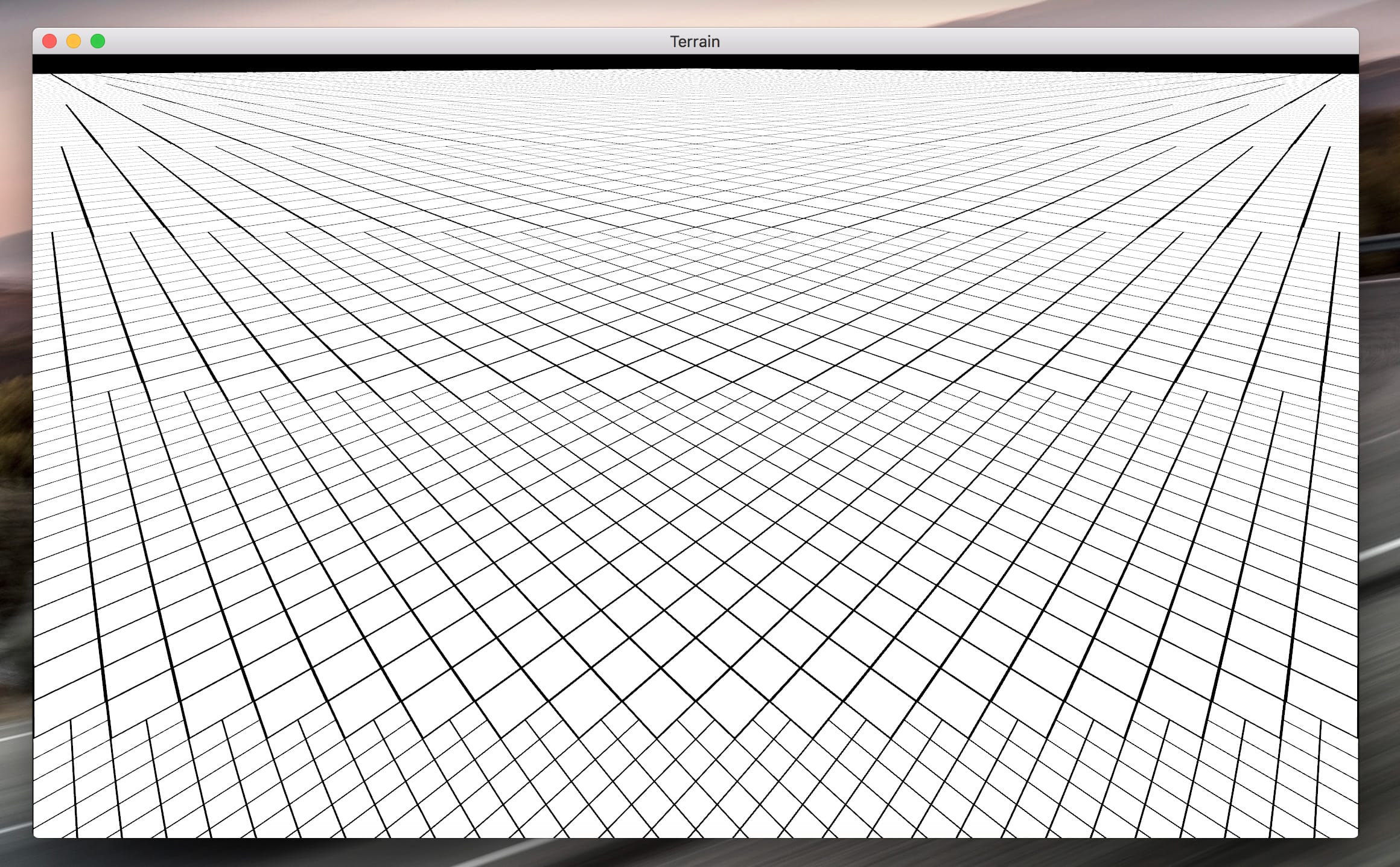
I used a similar setup when I was working on the port of my adaptive terrain solution for Apple platforms for numerous stages which were computed in the geometry shader. You can see the region subdivision stage below.

Until next time.

Understanding the need for memory barriers in multithreaded systems
Domagoj Pandza on July 8th, 2016
Programming
Show in single article view

Memory barriers are often confusing to people, newbies and consummate professionals alike. I reckon it is because most people learn that they need to use memory barriers but seldom go the extra kilometer of finding out why they're needed and what they're abstracting. Sure, they know that it is to prevent memory reordering but not why the reordering happens in the first place. As such, questions about memory barriers are brought up often in programming social circles.

This would be fine if it were possible to explain the nuances succinctly in a chat room inhabited by people with varying degrees of expertise on the subject, all generating noise in the communication channel. It isn't. And more often than not, I get annoyed by people butchering it. My goal here is to take a people on a tour and hopefully have a linkable resources by the end of it. But to get to get to the heart of this story, we've got to go back to the beginni— we've got to make sure your understanding of CPU caches is not merely "the stuff that hides main memory latency through black magic".

For whom it may concern

I know it's a little bit late, but I am the worst combination of busy and lazy. As an apology, I went a little above and beyond. If you need further clarification, @ me on chat.

Let's make sure we map to the same page

Otherwise, this article won't be very cache-money.

A cache is any construct which stores often needed resources in a quickly accessible manner, resources which would otherwise be temporally prohibitive to continually obtain from a backing store on an individual basis. While most of us are used to thinking about them in the context of software and hardware, the notion is based on real world caches which expire. Everyone has a cache. I have one on my desk, a miniature trash can filled with sour Skittles obtained from a local store called Plodine. As I often reach for them, buying them in spades from the store enables me quick access to them as long as they're not depleted, after which another roundtrip is needed.

A cache of Skittles ready for prompt consumption

Computer caches, on the other hand, are quick access staging areas for data and instructions. They do not expire unless instructed to do so and the system has a responsibility to propagate changes in both ways, from the caches to the comparatively slow main memory and vice versa in order for the state not to become corrupted or stale. Every load and store needs to be sanitized and checked for consistency which can be guaranteed by following carefully designed protocols to the letter (which computers are extremely good at).

In order to avoid diminishing returns, caches are never made too large. Multiple levels of cache are used instead, progressively increasing in size (and access times). This requires additional bookkeeping, but nets the best returns. Each respective level's size seldom changes. In fact, Intel hasn't changed the size of the first two levels of cache in over 10 years. They're actually on the brink of doing so with the next-gen Ice Lake architecture, increasing combined L1 cache to 80 KiB (data-biased, 3:2) and L2 to 512 KiB.

The architecture of a CPU cache reflects its purpose. Given its function is to be a buffer between the CPU and main memory, accessing it must be fast and a direct function of memory address. Thus, a CPU cache needs to be designed like a hardware hash table. And for the most part, that is exactly what it is. Furthermore, given that accesses in memory are more often than not localized, access granularity for a cache shouldn't be too small. Every time a fresh bit of memory is touched, it is desirable to take out an aligned swath, known as a cache line. The choice of size is not an easy one, but Intel has settled on using 64 bytes for their desktop products ever since Pentium IV. A single cache line is augmented with necessary metadata such as flags and tags. Thus, physically, caches are larger than their logical description for the purposes of internal bookkeeping.

As the cache gets populated (not even necessarily filled up to capacity), due to its design as a fixed-size hardware hash table, conflicts on loads are inevitable. This means that cache lines from conflicting ways need to be sanitized and evicted. Thus, eviction protocols are of paramount importance, especially as data may need to be propagated back to main memory. Other cores may also need to be notified of the eviction.

With all this in mind, a CPU cache is composed out of $n$-sized hash buckets called "sets" where each can thus be inhabited in $n$ "ways" each sufficiently sized to harbor a single cache line. To put this in practical terms, one of my favorite Intel processors of all time, the i7-2600K (which is still alive and kicking in many machines almost a decade later) has an evenly split 8-way set associative 64 KiB L1 cache. $32$ KiB ($2^{15}$ B) are dedicated to data and the size of a cache line, as discussed, is $64$ B ($2^6$ B). In total, it can hold $32768 / 64 = 512$ cache lines. Each set can hold $8$ of these cache lines, thus the number sets is $64$.


Way / Set 0 1 2 3
0x0 0x00000000
0x1 0x00000040 0x10000040 0x20000040
0x2 0x00000080 0x10000080
0x3 0x000000c0 0x130000c0 0x200000c0 0x300000c0
0x4 0x00000100
0x5 0x00000140
0x6 0x00000180
0x7 0x000001c0

As you might imagine, this would be difficult to showcase and reason about here, thus we will be using a fictional, crappy two-core multiprocessor for the duration of this article. It conveniently has only one level of four-way set associative cache per core (eight sets on each), a preview of which you can see above. The complexity of adding more levels of cache is staggering, just consider a decade old processor like the 2600K also has a similarly configured 256 KiB L2 cache per core and a third level of cache, up to 16-way set associative, which is shared between four cores (lending up to 2 MiB to each) and the integrated GPU. Intel refers to it as the Last Level Cache or LLC. Not to mention that cache functionality, interops and even mere addressing rises in complexity with the level of the cache discussed.

Indexing an L1 cache

Sticking to the lowest level, how do we go from a memory address to a slot in the L1 cache? We utilize low bits of the underlying virtual address (prior to translating as the relevant bits remain unchanged by it given the smallest page size is $4096$ bytes). Since we decided on a $64$ byte wide cache line ($2^6$ B), the six lowest significant bits address the data to be shoveled into a specific way of a specific set. Given that we only have $8$ sets in our toy cache, we only need bits $6$-$8$ to determine in which set our cache line lands. In parallel with this, we also translate the virtual address into the physical one and use the tags derived from the upper physical address associated with each "way" to determine which one gets it. Specifically, for the tag bit count we subtract the address width of the cache line itself ($6$ in our case) and the index width ($3$ in our case).

Assuming our processor is 32-bit (because nobody has time to write out 48-52 bits), say we have a memory address of 0x130000c0, bitwise that's 0001 0011 0000 0000 0000 0000 1100 0000. Bits 6-8 are $011$ or 0x3. The "ways" divide the particular indexed set into slots as a function of the tag (which is computed as the remaining $32-6-3 = 23$ upper bits of the translated physical address). In our table, it lands coarsely in way 1 of set 0x3.

Some lingo to keep in mind

Failure to obtain data from the cache is known as a cache miss. It instigates a load of a cache line containing the desired data. Conversely, a cache miss due to a different cache line in the desired slot of a set is sometimes called a capacity miss (even though not necessarily at capacity). A cache miss trying to access a recently evicted line is referred to as an associativity miss.

Duplicating cores means duplicating caches

An obvious, but critical observation

The nuanced dance between all the cores and their local low-level caches is where the complexity arises. Especially when we consider writing data as opposed to simple reading. Making a fast cache for each core is trivial compared to ensuring timely data consistency across multiple cores in a multithreaded environment. We will show how modern cache coherency design introduces the need for memory barriers in order to remain as fast as possible while producing results we deem correct (because the computer doesn't care).

Take, for example, a simple write to the cache by CPU 0. The target cache line might be shared/duplicated by CPU 1. Obviously, you don't write the value to both caches, you just tell (we'll quantify how shortly) CPU 1 to consider its cache line invalid and mark CPU 0's cache line as modifiable. Then we proceed to write our new data. Should CPU 1 need it later on, it will have to request it from CPU 0's cache after suffering a cache miss on its own. You're beginning to see the importance of keeping data coherent across multiple cores and caches. But how exactly is this achieved, especially as multiple threads start manipulating the same data? To cover all the possibilities, the protocols involved are very involved. However, we're in luck as there's only one specific and comparatively simple protocol that directly concerns us for the purposes of this article.

Comic relief

This reminds me of the joke where a man claimed to be quick at arithmetic. When asked what's $18$ times $19$, he espoused $26$ to everyone's bamboozlement. Alas, he said he was quick at arithmetic, not necessarily correct.

The Illinois Protocol

MESI (Modified / Exclusive / Shared / Invalid) protocol, also known as the Illinois protocol, is an invalidation-based cache-coherence protocol compatible with the more performant write-back caches, as opposed to write-through ones. Its name stands for the four states on which it is based.

Each cache line takes one of these states, encoded in an additional two-bit tag associated with it. Following is a short description of the possible states:

  • Modified state is set on any cache line in the cache of a CPU that modified it recently, usually after moving from a Shared state. This means it only exists in that CPU's cache as others received an invalidation order previously. Furthermore, as we're talking about a write-back cache, the CPU is responsible for this data. Either to write it back to the main memory or hand it off to some other CPU's cache (share, then receive invalidation order).
  • Exclusive state is set prior to modification of a cache line. At this point, the data still up-to-date and the CPU itself has no responsibilities towards it yet. In this state, it is accessible only be the CPU in whose cache it is marked as such.
  • Shared state is set on any cache line which is shared across multiple CPUs, in other words, there is at least one copy of it in other CPUs' caches. In this state, it is up-to-date and cannot be modified without ordering the acting CPU's cache line state to exclusive and the remaining ones to invalid.
  • Invalid state is set on any cache line which is currently "open for business", unused. It is preferable to place any new data inside invalid cache lines as others require overhead in the way of MESI state changes communicated between the participating CPUs and their caches. Not that there is much you can do over the choice of set and way, though.

How are these states transitioned? Messages. MESI protocol is a message-passing protocol. The messages themselves are simple, the most important ones being the read and invalidate requests alongside their responses, including the combined read-invalidate message commonly known as RFO / Read For Ownership. And of course, the writeback request which facilitates the timely completion of a CPU's responsibilities to a cache line in the modified state before it gets evicted.

Suppose now we have a cache line in CPU 1's cache which we want to modify by CPU 0 whose own cache line is marked as effectively invalid. By agreement to ensure cache coherency, we cannot write to the cache line until all other CPUs invalidate their copies and send a confirmation to the CPU wanting to modify it, to perform any remaining actions currently in progress. This is wasteful as CPU 0 in this case will stall as it waits for the invalidation confirmation after sending an RFO, especially as it intends to just overwrite the data immediately.

Write policies

A write-back cache doesn't rush to reflect its changes in main memory, data propagation is deferred until a block is being evicted/replaced. A write-through cache synchronously writes both to the cache and the backing memory. Former requires more bookkeeping than the latter.

Enter the store buffer

To this end, store buffers were introduced. Their name is apt, the CPU performs intermediate stores in them while awaiting an invalidation confirmation from other CPUs. This allows the CPU in question to process further instructions without stalling. To avoid reading stale information when acting on its own cache data, the CPU owning the store buffer can also check for updated information waiting to write through and act on it instead. Other CPUs cannot see the contents of their twins' store buffers.

This is what instigates the need for write memory barriers. Some writes which require access to an unowned cache line will be stuck in the store buffer while others whose target cache line is already in the cache (modified / exclusive) will be modified first, even though the instruction came in second (from the perspective of another CPU which cannot snoop other CPUs’ store buffers). The writes are out of order for speed. While the pursuit of speed is great, sometimes you need to slow down to get things right. Most of the time, this doesn’t matter. But when you depend on some variables to be modified in a specific memory order, you need a write memory barrier instruction in place.

In reality, it's actually an attribute on another instruction rather than an instruction itself (but it can be). The CPU with the memory barrier instruction will do two things. First, mark store buffer entries that precede the barrier and are halting the flush (awaiting RFO/invalidation confirmation). Second, prevent any further writes to the cache by any subsequent instruction by buffering those writes as well (unmarked). This will prevent cache writes from going out of order wrt what the programmer expects as, once again, other CPUs cannot see the contents of their twins' store buffers. Once the invalidation confirmations are received, the store buffer is flushed to the cache and changes become visible to other threads, with proper effective order.

"Let's go into invalidation debt!"

On the flip side, hardware designers found another performance loophole to exploit. Instead of actually invalidating the cache line immediately, just go into debt by sending a confirmation immediately. This way, a queue is formed which needs to be cleared before sending any further messages regarding the affected cache lines. This is useful because the CPU might be involved in something more important than invalidating an unused cache line (at that moment). Furthermore, due to physical constraints, the CPU itself cannot check its invalidation queue like it can the store buffer.

What does it mean for the CPU to be in "invalidation debt"? Unperformed invalidations leave its cache in a stale state as it will keep reading data from invalidated cache lines under the impression they're valid. Thus, we need read memory barriers. Read memory barriers ensure that the invalidation queue gets flushed and, in this case, means the CPU needs to stall until this is done as further processing depends on data written by other CPUs to become visible.

Write, read and general memory barriers

This will have undoubtedly placed some moderate pressure on your brain. So, let's recap together. A write memory barrier ensures that every write preceding the barrier is effectively completed before the one superseding it, from the perspective of some other thread (!). This is done by hiding out-of-order writes in the store buffer as unmarked while waiting for invalidation confirmation of the one we want to appear to have been written before. So once all the marked entries have their matching invalidation confirmations received, the entire store buffer is flushed to the cache, ready for other threads to request access to it.

A read memory barrier ensures that writes done by other threads/CPUs are all visible to the invoking CPU/thread by making sure the invalidation queue is empty and offending cache lines are invalidated, forcing loads to request access to up-to-date information after a cache miss.

General memory barriers combine both read and write memory barriers, which is a more complicated operation that is not always required. Hence on most architectures, these instructions are offered individually.